
TravelMedForum How-To Guide
You asked, we listened! ISTM is excited to announce the relaunch of the TravelMedForum. The new and improved forum will be hosted on the groups.io platform, providing a secure modern listserv and discussion board exclusively for ISTM members.
To get started, watch the tutorial video, follow the instructions below or download this handy PDF how-to guide.
How to Join the TravelMedForum
- Sign up for a Groups.io account.
Please Note: ISTM Members must enter the same email address used for your ISTM Membership in order to gain access to the forum. If you wish to use a different email address for the forum, you must email ISTM prior to joining the group to inform them of this update. - Once you have a Groups.io account, visit the TravelMedForum Homepage, travelmedforum.groups.io.
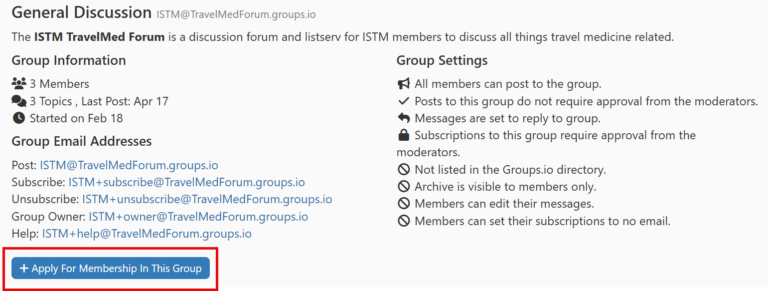
- To join the group, scroll down and select the ‘Apply for Membership In This Group’ button.
Once ISTM receives your membership request, they will review the request and approve if you are an ISTM member.
Once your request is approved, you will receive a welcome email from groups.io with information that includes the group web address, the group email address and subscription management settings.
Participating in the TravelMedForum – Traditional Email Listserv
Those who wish to participate in the forum through the traditional email listserv can submit a post to ISTM@TravelMedForum.groups.io. You will receive email notifications when a response(s) is added and can reply via email, all without logging into the groups.io platform.
Note: You must still create an account and join the group before submitting a post via email.
Participating in the TravelMedForum – Groups.io Website
Visit the TravelMedForum discussion board to view and search current topics, submit new topics, check messages and manage your subscription.
Submit New Topic / Question for Discussion
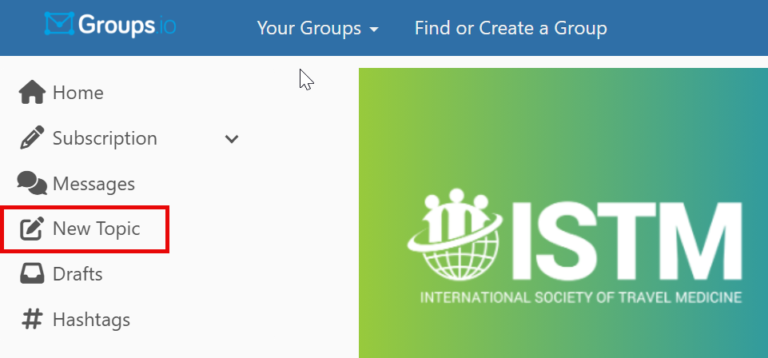
To submit a new topic for discussion, select the New Topic button in the menu, then add a subject and message text. Select the ‘Send’ button to submit your topic. Topics are automatically saved into your account ‘Drafts’ folder unless you select ‘Send’ or ‘Discard.’
Tip: Search the forum first before creating a new topic.
View Current Topics / Questions
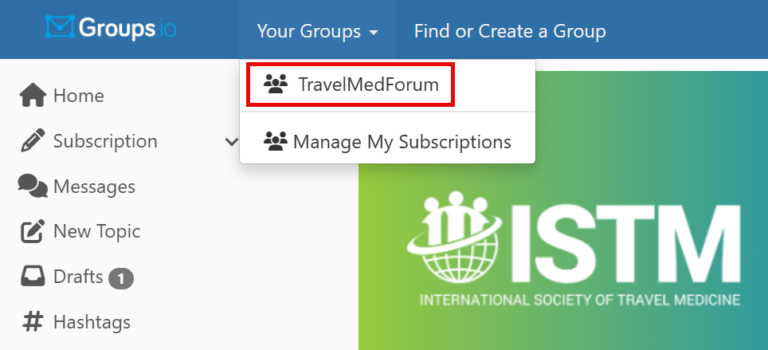
To view and search current discussion topics, select ‘Your Groups’ from the top navigation menu, then select ‘TravelMedForum’ from the dropdown menu.
Reply to Discussion Topics
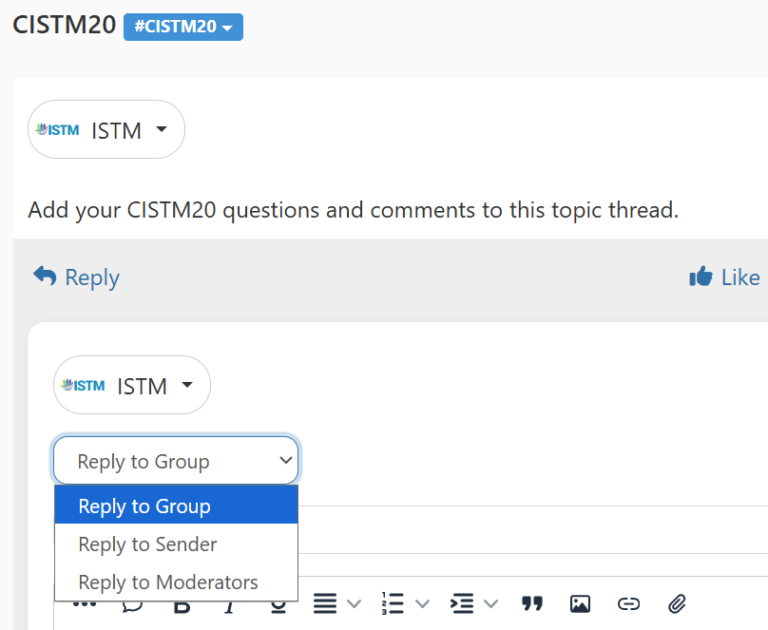
To reply to an existing discussion topic and hit the reply button, type your message and then hit send.
Tip: You can send your reply to the entire group, the person who you are replying to or the moderator.
Muting Topics
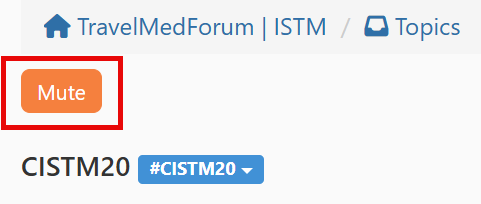
Receiving too many emails for a topic? You can mute a specific topic. To mute a topic, visit the topic page and select the ‘mute’ button as shown below. You can toggle this on/off at any time.
Note: Muting a topic only stops email notifications for you, not for the entire group.
Editing Your Subscription Settings
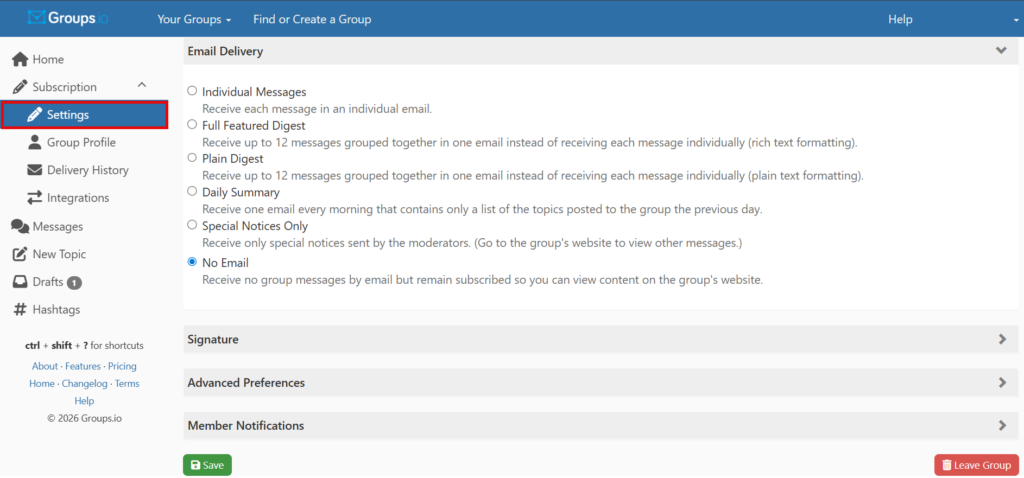
To update your TravelMedForum email and notification settings, select ‘Subscription’ and then ‘Settings’ from the menu.
Here you can set your email and notification delivery preferences, as well as create a signature for web or email posting. Receiving too many or too few emails? Please visit your subscription settings to manage notifications. ISTM is unable to set delivery preferences for individual accounts.
To update your profile, select ‘Group Profile’ under ‘Subscription.’ This will allow you to add a profile picture and edit your display name, as well as add your bio, location and website.
Groups.io Platform Help
General information about Groups.io can be found here:
Posting Guidelines
Ensure your posts and replies are relevant and focused on professional topics.
✅DO post contributions adhering to the following:
- Discuss pre-travel and post-travel medical cases or general travel health issues.
- Share current and significant information from publications, websites or other credible sources.
- Announce travel medicine conferences, workshops and short courses.
- Recommend books, websites, publications, products or services, and disclose any conflicts of interest if appropriate.
- Request information about Travel Medicine providers in locations not listed in the ISTM Global Clinic Directory. These requests should start with “Clinic Needed.”
Content Guidelines
- Be respectful and avoid conflict: Discussions should encourage knowledge-sharing, not personal attacks or arguments.
- Disclose financial interests: If you are involved in a product or service you recommend, you must disclose your financial interest.
- Avoid personal messages and irrelevant posts: Do not send “thank you” or “me too” messages to the entire list; send them directly to the individual instead.
- Do not post certain content: Avoid sending defamatory, abusive, profane, threatening, offensive or illegal content.
- Do not post slogans, taglines or political/religious statements: These types of posts are prohibited.
Consequences for Violations
📌 ISTM reserves the right to suspend posting privileges for members who violate these rules.
📌 All posts are public and subject to libel, slander and antitrust laws, so exercise caution and good judgment.
📌 If you have questions about the TravelMed Forum, please contact ISTM. The TravelMed Forum is regularly monitored by the ISTM Professional Team for adherence to the rules.